
What a Placer County Court Docket Shows
A docket is the running log of court events in a single case. In Placer County, the docket is called the register of actions, and it lives inside the case file kept by the Clerk of the Superior Court. Each line on the docket is one event. A line might note that a complaint was filed, that proof of service came in, that a hearing was set, that a motion was heard, or that a judgment was entered. The clerk adds new lines as the case moves. Old lines stay in place. The docket is a map of the case.
The docket is not the full case file. The full file holds the actual papers: complaints, answers, motions, declarations, exhibits, orders, and minute orders. The docket only lists that those things were filed and on what date. To read the text of a filed document, a user often needs portal access, a courthouse visit, or a copy request. Public docket access is broader than full document access under California Rule of Court 2.503. That rule limits remote viewing of family, juvenile, mental health, guardianship, and most criminal documents, even when the docket entries themselves are visible.
Placer Superior Court is the only trial court for the county. There are no separate district courts, justice courts, or municipal courts. Every civil, criminal, family, probate, juvenile, traffic, and small claims docket runs through the same court system. Dockets are split by department, not by court level. A felony docket may live in Department 14, 30, 32, 33, or 44. A family law docket may live in Department 1 or 2. A traffic docket may live in Department 30. The case number prefix and the assigned department point to where the docket sits.
How to Find a Placer County Docket Entry
The Placer Superior Court eCourt portal is the front door for online docket searches. It is free for the public, and no account is needed to view basic case information. The portal address is https://webportal.placerco.org/ecourtpublic/. After accepting the terms, choose Search for a Case under Public Services. The Case Search-EXT form takes a name, a company, or a case number. One field always trips up new users: the filed date. A search without the correct filing date will not return the case, even if every other field is right.
- Go to webportal.placerco.org/ecourtpublic/ and accept the terms of use. The portal warns that the data is not the official court record and that recent filings may not yet be in the system.
- Click Search for a Case under Public Services. No login is required for basic docket views. Pick Case Search-EXT from the menu to use the broadest search form.
- Enter a last name and first name, a last name with the first initial, a company name, or a Placer case number. Family and civil case numbers begin with letters and seven digits, such as S-CV-0000001 or S-DR-0000001. Criminal numbers normally begin with 62 and seven digits, such as 62-0000001.
- Set the Filed date or date range to a window that includes the original case filing date. Pick a wide range when in doubt, then narrow. Do not use the date of a later hearing or motion. That is the single most common reason a Placer search returns nothing.
- Click Search. Review the case list, then click a case to open the register of actions. Each docket line shows the event date, the event type, the party who filed, and a link to the document if one is available to the public.
- To pull a hearing calendar or upcoming court dates, switch to the calendar search tools. To track every event tied to a particular attorney, use the Attorney Event Search by Bar Number tool.
Cases that the portal cannot show online include adoptions, mental health, juvenile, search warrants, Ramey warrants, and sealed cases. For those, a user must visit the proper courthouse and ask the clerk for any record they are entitled to see. Even on cases that do appear, document images may be locked behind party-only access under Rule 2.503. The docket line will still display, but the linked file will not open.
Attorney Event Search by Bar Number
The Attorney Event Search is one of the most useful tools on the Placer portal, and it gets very little attention. It lets a user pull every court event linked to a single State Bar number across a date range. That means a quick way to see what a Placer County lawyer has on calendar next week, or where they appeared last month. Reporters, paralegals, opposing counsel, and the public all use it. The tool sits at https://webportal.placerco.org/ecourtpublic/?q=node/18. The form has two fields, and both work with the same operator dropdowns used elsewhere in the portal.
| Field Label | Type | Required | Options and Format Notes |
|---|---|---|---|
| Start Date Time | Date or date range | Unspecified by form | Operators: equals, blank, not blank, equals plus nulls. Date presets: Today, Tomorrow, Yesterday, Next 7 Days, Next 14 Days, Next 21 Days, Last 10 Days, This Week, Last Week, Next Week, This Month, Last Month, Next Month, This Quarter, Last Quarter, Next Quarter, This Year, Last Year, Next Year, Last 12 Months, Next 12 Months, Single Day, User Select. |
| Bar # | Text with operator dropdown | Unspecified by form | Operators: equals, not equals, starts with, ends with, contains, not contains, soundex, in, not in, blank, not blank, plus null variants. Use the seven-digit California State Bar number. |
The output is a list of court events for that bar number in the chosen window. Each row shows the event date, time, department, case number, and event type. The tool will not return events for sealed or confidential matters. It also will not list events from courts outside Placer County. If a lawyer practices in both Placer and Sacramento, only the Placer events appear here.
Where Placer County Dockets Are Heard
Placer Superior Court runs dockets out of four main court buildings. Each building covers a set of departments. Each department has a calendar tied to one or more case types. Knowing the department is the fastest way to figure out where a docket call will take place, and at what time. The chart below pulls from the official judicial assignments page. A short note appears on the placer.courts.ca.gov site that the assignments change with each new presiding judge order, so check the live page for the most current calendar mix.
For a closer look at department maps and judicial assignment patterns, the official source is the Placer Superior Court page at https://www.placer.courts.ca.gov/general-information/judicial-assignments.
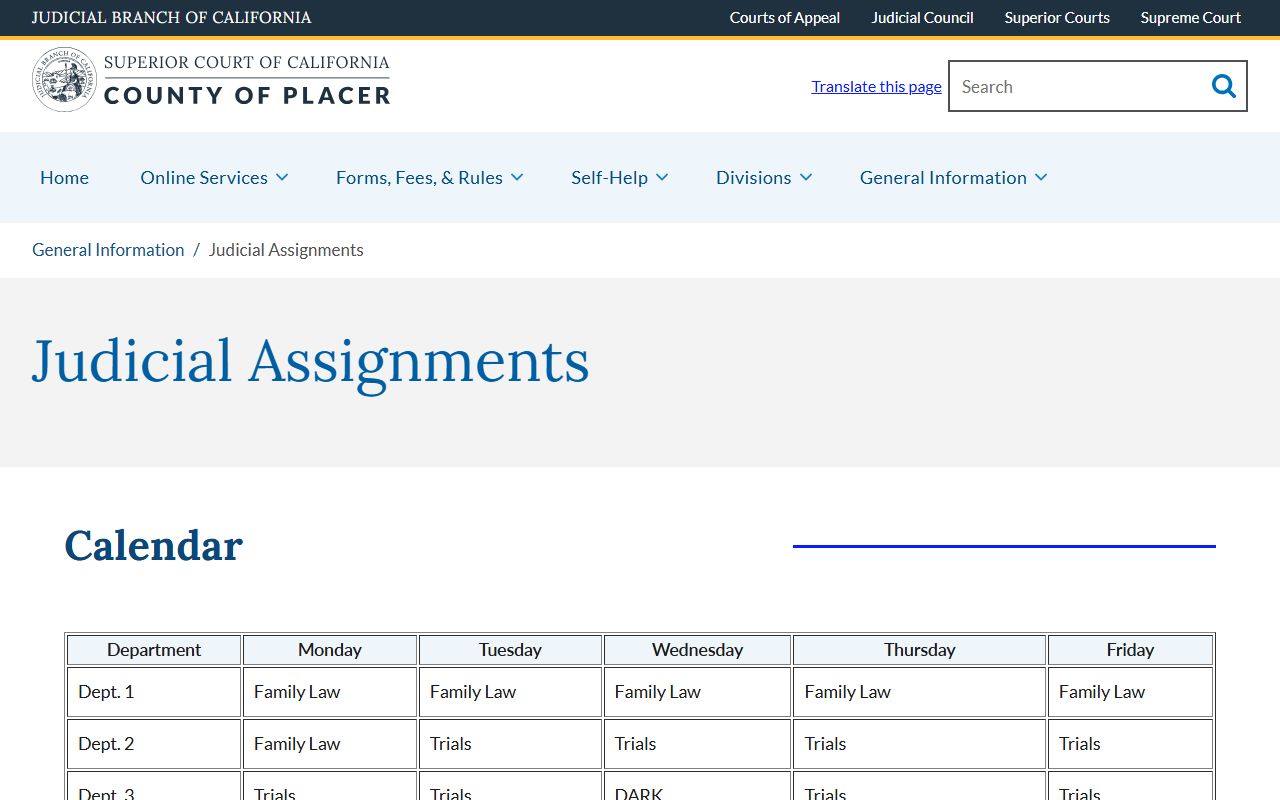
The screenshot above shows the published department mix that drives every daily docket. Use it to match a case number prefix to the right department before heading to court.
| Department | Courthouse | Docket Mix |
|---|---|---|
| Dept 1 | Historic Courthouse, Auburn | Family law, Monday through Friday. |
| Dept 2 | Historic Courthouse, Auburn | Family law on Monday; trials Tuesday through Friday. |
| Dept 3 | Historic Courthouse, Auburn | Trials, civil law and motion on Thursday, dark Wednesday. |
| Dept 6 | Historic Courthouse, Auburn | Civil law and motion assignments. |
| Dept 12 | Juvenile Courthouse, Auburn | Juvenile justice and juvenile dependency. |
| Dept 14 | Gibson Courthouse, Roseville | Misdemeanor and traffic, felony, Drug Court first Thursday, family and civil on Friday. |
| Dept 20 | Jail Courtroom, Roseville | Criminal calendars set by case-number endings. |
| Dept 30 | Gibson Courthouse, Roseville | Traffic and non-traffic infractions, criminal, criminal domestic violence felony, family, civil. |
| Dept 32 | Gibson Courthouse, Roseville | Criminal and civil; Recovery Court and Proposition 36 on 1st, 3rd, 4th Wednesdays; odd or even misdemeanor calendars. |
| Dept 33 | Gibson Courthouse, Roseville | Misdemeanor DUI odd or even calendars, Veterans Court second Wednesday, felony DUI, civil. |
| Dept 40 | Gibson Courthouse, Roseville | Civil and family support. |
| Dept 43 | Gibson Courthouse, Roseville | Criminal, civil, juvenile, truancy, juvenile drug court, family law. |
| Dept 44 | Gibson Courthouse, Roseville | Criminal, trials, Community Court first and third Friday. |
Departments 1 through 6 sit at the Historic Courthouse at 101 Maple Street in Auburn. Departments 30 through 44 sit at the Hon. Howard G. Gibson Courthouse at 10820 Justice Center Drive in Roseville. Department 12 is the Juvenile Courthouse at 11270 B Avenue in Auburn. Department 20 is the Superior Court Jail Courtroom at 11801 Go For Broke Road in Roseville. The main court phone for all four buildings is (916) 408-6000. Juvenile dials at (530) 745-2100.
Note: Department assignments shift with each new presiding judge order, so always check the official judicial assignments page before relying on a docket pattern.
Criminal Docket Patterns by Case Number
Placer criminal dockets sort cases by the last digits of the case number. Department 20, the jail courtroom in Roseville, sets its daily calendars by those endings. Department 32 splits misdemeanors into odd and even groups. Department 33 does the same for misdemeanor DUI cases. The pattern is meant to spread the workload across the week. For a defendant or lawyer, it means the day a case is called depends on the number, not on choice.
Felony arraignments, in-custody appearances, and bail motions tend to land in Department 20 because of the jail courtroom location. Felony DUI dockets run through Department 33. Recovery Court hearings run through Department 32 on the first, third, and fourth Wednesdays. Veterans Court sits in Department 33 on the second Wednesday of each month. Drug Court hearings sit in Department 14 on the first Thursday. These collaborative calendars are short, focused, and often closed to people who are not parties, lawyers, treatment staff, or court support staff. The dockets, however, are still part of the public record of actions on each case. For a full overview of how charges and arrest filings connect to the docket, see the criminal records page.
Tentative rulings are another docket-adjacent feature worth noting. In civil law and motion calendars, Placer judges may post a tentative ruling the day before the hearing. The notice tells the parties what the judge is leaning toward. A party can accept the tentative or argue against it the next day. The tentative ruling itself becomes part of the register of actions once it is filed.
Sample Placer County Docket Entry Fields
Every Placer docket line follows the same basic shape. Once a user knows what each column means, reading a long register of actions becomes much easier. The list below mirrors what shows up on the portal screen after a successful case search.
| Field | What It Shows |
|---|---|
| Entry Date | The date the clerk added the event to the register of actions. Not the date the underlying motion was argued, unless the entry is a minute order. |
| Event Type | Short label such as Complaint Filed, Proof of Service, Motion to Compel, Minute Order, Order, Hearing Set, Continuance, Judgment, or Warrant Issued. |
| Party Filing | The party or attorney who lodged the document, listed by name or by role such as Plaintiff, Petitioner, Defendant, Respondent, or the People. |
| Hearing Date and Time | For events that set a future date, the calendar slot, the department, and the time of day. |
| Judicial Officer | The judge or commissioner who signed an order or presided at a hearing, when displayed. |
| Document Link | A link to the filed image if the document is public and the case type allows remote view. Civil and probate documents from August 28, 2017 forward may be viewable. Criminal, family, and juvenile documents are usually not. |
A case number prefix tells the user where to look first. CV is civil. FS is a family support case. DR is dissolution or related family. PR is probate. SC is small claims. TR is traffic. JV is juvenile. Criminal cases use the 62 prefix. The portal will not let a user mix and match prefixes with the wrong search field. Use the right prefix or none at all.
Docket Terms Glossary for Placer County
Court dockets are full of short phrases and Latin words that look strange the first time they appear. The list below covers the most common terms a Placer reader will see on the register of actions, in a minute order, or on a hearing notice. Keep this open in a tab while reading a case.
- Register of actions
- The official Placer name for the docket. It is the chronological list of every filing, hearing, order, and minute order in a case.
- Minute order
- A short clerk record of what happened at a hearing. It is signed by the clerk and entered into the register of actions the same day or soon after.
- Tentative ruling
- A judge's draft decision posted before a civil law and motion hearing. Parties can accept it or argue against it the next day.
- Continuance
- An order moving a hearing or deadline to a later date. The new date is added as a fresh docket line.
- Proof of service
- A document showing that papers were legally delivered. Many Placer dockets pause until this entry posts.
- Ex parte
- A request heard on short notice with limited input from the other side. Often used for urgent restraining orders or emergency custody.
- Bench warrant
- A warrant issued by the judge from the bench, usually for a missed court date. It will show as Warrant Issued on the docket.
- Disposition
- The outcome of a charge, claim, or case. A docket may end with Dismissed, Judgment Entered, Convicted, Acquitted, or Settled.
- Dark day
- A day when a department does not hold calendar. Dept 3 is dark on Wednesday, for example. No new docket calls happen that day.
- Trial setting conference
- A hearing where the judge picks a trial date and sets pretrial deadlines. It shows as TSC or Trial Setting on the docket.
Docket vs Full Case File in Placer County
People often ask for "the docket" when they actually need the full file, or the other way around. The two are not the same. A docket is the list. A file is the box. Both come from the clerk, but they cost different things and have different access rules.
| Docket | Full Case File | |
|---|---|---|
| Format | Short list of events with date, type, and party | Full text of each filing, including motions, exhibits, and orders |
| Access | Free on the eCourt portal for most case types | May need party login, courthouse visit, or copy fee |
| Use | Track case progress and check upcoming hearings | Read legal arguments, exhibits, judgments, and detailed orders |
| Limits | Adoption, juvenile, mental health, search warrant, and sealed dockets are not online | Family, criminal, and many other documents are courthouse-only under Rule 2.503 |
For full file access on a Placer case, a party or attorney of record may set up a portal account, sign the case access form, and complete a Zoom video ID step with the court. A non-party can still visit the courthouse and ask the clerk to view any document that is not sealed. Copy fees apply for printouts and certified copies. For the broader request process, see the court records page and the page for the Superior Court. Traffic dockets and ticket pay-offs route through the same portal and the same clerk; details live on the traffic court records page.